


Greenlight: For Families
4.710.87K Reviews
App Specs
- Version
- 8.6.0
- Updated On
- License
- Free
- Downloads
- 1,000,000+
- Developer
- Greenlight Financial Technology, Inc.
- Categories
- Finance
- Platform
- Android, iOS
Screenshots


 Analysis by AppCompare
When I look at a family money app, I want to know what a parent actually does first, what a child can learn from it, and whether the routine feels manageable after the initial setup. Greenlight: For Families is a finance app from Greenlight Financial Technology, Inc., built around parents managing a debit card for kids and teens through an app. It is aimed at families who want money conversations to happen alongside everyday spending, rather than only during a formal lesson.
What to expect from a family money app
The basic idea is practical: a child gets a card to use for purchases, while a parent manages the arrangement in the app. That makes Greenlight different from a basic allowance tracker or a spreadsheet. The learning opportunity comes from connecting money decisions to real choices: spending now, saving toward something, and talking through what happens when a balance changes.
That approach is most useful when adults are ready to stay involved. A card alone does not teach budgeting, and an app cannot replace a conversation about why one purchase is worth making and another can wait. I’d think of Greenlight as a structure for those conversations, not as a substitute for them. For a first-time user, the most reassuring goal is modest: get the family comfortable with how the card and app fit into a regular week.
Starting with a clear family routine
Before setting anything up, I’d agree on a few simple expectations with the child: what kinds of purchases the card is for, when they should check with a parent, and what saving means in your household. This prevents the app from becoming a source of surprise rules after a child has already started using the card. It also gives parents a concrete way to explain their decisions rather than relying on a blanket “because I said so.”
It helps to choose one small, understandable purpose for the first stretch of use. For a younger child, that might be learning to pause before spending. For a teen, it could be managing a planned expense independently while still knowing a parent is involved. Keep the first goal realistic; a complicated family system is harder to maintain than a simple routine everyone understands.
A first useful action: make one decision together
A good first success does not need to be a major purchase. Sit down together, look at the app, and talk through a real upcoming choice: should the child spend on a small treat, set money aside for something they want, or wait? The value is in letting the child explain their thinking before a parent steps in. If the family has a savings goal available in its setup, connecting it to a specific item can make the idea of saving feel less abstract.
For example, imagine a child wants to buy something during a weekend outing but is also saving for a larger item. Instead of deciding for them, a parent can ask how today’s purchase affects that longer-term plan. That turns a routine moment into a low-stakes budgeting conversation. The parent can still provide guidance, but the child gets practice weighing immediate enjoyment against a goal they chose.
Worth Reading Before You Choose

EA SPORTS FC Mobile 26 Is a Bigger Football Game, but It Takes Time

Flipboard Shows What News Apps Must Do Beyond the Feed

Switching to Android Auto Means Rethinking Your Driving Routine

Google Calendar Makes a Crowded Week Easier to Manage

Ludo King Makes the Most of the Minutes Between Plans

Baby Panda World Brings Quick Play to Modern Phones, but Its Game Library Feels Busy
Where parents should stay involved
Children and teens do not all need the same level of independence. A younger child may need a parent to talk through almost every purchase, while an older teen may be ready to make more day-to-day decisions. I would set expectations around the child’s maturity and the family’s comfort, then revisit them as habits develop. The card should be a teaching tool, not a test a child can fail without discussion.
Parents should also treat the app as one part of their household’s money arrangement. Decide how the child will ask questions, how you will discuss mistakes, and what happens if a purchase causes concern. If those conversations are uncomfortable, giving a child a card may expose the tension rather than solve it. Starting with a shared rule and a calm review of decisions can make the experience feel supportive instead of like constant monitoring.
Learning through everyday money choices
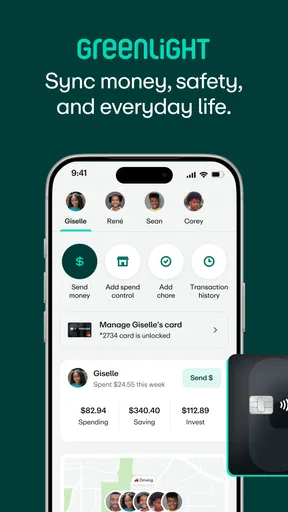
One of the coolest features of Greenlight: For Families is how it lets kids and parents work together to learn about money. You can set up different accounts for your kids, and they get their own debit card. Yes, you read that right—a real card they can use to make purchases. But don’t worry, you’re still in control. You can set spending limits, track transactions, and even approve purchases. It’s like giving them training wheels for financial independence.
Saving goals and rewards
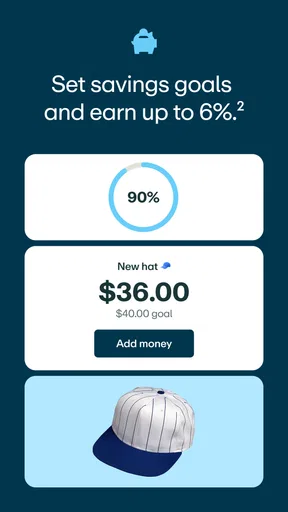
Remember those piggy banks we had as kids? This app takes that concept and supercharges it. Your kids can set up savings goals, whether it's for a new bike, a game, or even a donation to their favorite charity. You can match their savings to encourage them, or set up interest rates to teach them how interest works. It’s a great way to turn abstract financial concepts into real-life learning experiences.
The useful habit here is to make a goal specific enough that a child can picture it. A broad instruction to “save more” can feel like a punishment; saving toward something the child picked gives the decision a purpose. I’d also talk about any parent contribution as part of the lesson. Matching or interest can help explain how money may grow, but it is worth making clear which part came from the child and which part came from the parent, so the achievement still feels earned.
There is a trade-off: family incentives can motivate a child, but they can also become the main reason to save. If the goal is long-term understanding, occasionally discuss why the child wants the item and how long they are willing to wait, not just how quickly a parent can add a reward. That keeps the focus on planning and choice rather than turning every saving decision into a contest for extra money.
Chores and allowance
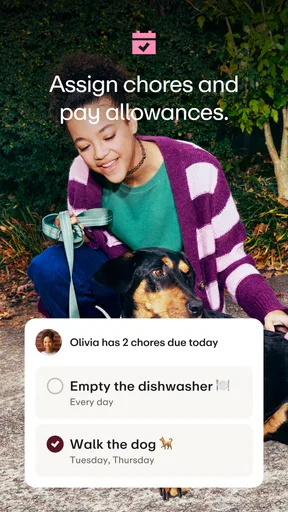
If you’ve ever struggled with getting your kids to do chores, you’ll love this feature. You can assign chores and set up automatic allowance payments. It’s a fantastic way to teach them the value of work and earning money. Plus, it helps them learn how to budget their allowance over time. Watching my kids negotiate their “contracts” for chores was a new level of entertainment.
For a family using chores as part of its routine, I’d decide in advance which jobs are expected as ordinary household contributions and which ones earn allowance. Otherwise, the app can make every helpful act feel like a transaction. A weekly check-in can also prevent disagreements about whether a task was completed. The point is not to turn home life into bookkeeping; it is to make the family’s expectations clear and give children a chance to connect effort with money.
Automatic payments can reduce the need for parents to remember each allowance moment, but automation is only helpful when the arrangement is understood. I’d explain the schedule and the rules before relying on it, then check in together after the first payment. That gives the child a chance to see the connection between the agreement and the money arriving, rather than treating it as something that simply appears.
Learning resources and real-world practice
Beyond managing money, Greenlight offers a treasure trove of resources for teaching kids about finances. From articles to videos, it’s packed with content that breaks down complex topics into kid-friendly bites. It’s like having a financial advisor in your pocket, tailored for the younger crowd.
I’d use educational material as a starting point for a short conversation, not assign it as homework and assume the lesson has landed. Ask the child to explain an idea in their own words, then connect it to a choice they are likely to face. A discussion about saving, for instance, becomes more memorable when it helps decide whether to use money today or keep working toward a chosen goal.
Families who already teach money through cash may wonder whether a card-based approach is better. Cash can make the amount left over easy to see and can suit younger children who benefit from handling physical money. A debit card and app can be more convenient when a child is making purchases electronically or needs to practice managing money beyond a jar at home. Neither approach is automatically superior; the better fit depends on the child, the family’s habits, and how much adult involvement feels appropriate.
Security, limits, and practical boundaries
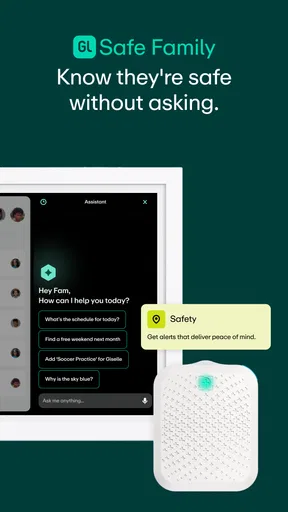
Now, let’s talk security—because I know that’s a biggie. The app uses robust security measures to ensure your data and your child’s data are safe. Plus, if a card gets lost or stolen, you can instantly lock it from the app. It’s peace of mind, bundled in an app.
Even with a card-lock option, I would make sure a child knows what to do if a card goes missing: tell a parent promptly rather than waiting to see whether it turns up. It is also sensible to explain that a payment card is not permission to buy anything without discussion. Limits and oversight can help parents guide spending, but they work best when the child understands the reasoning behind them.
One everyday friction point with any parent-managed card is that the adult and child may see independence differently. A teen may regard a declined or questioned purchase as distrust, while a parent may see it as normal oversight. Agreeing in advance on what the child can decide alone—and what merits a conversation—can prevent a payment moment from becoming an argument. The right balance will vary, so I would treat the arrangement as something to adjust as trust and experience grow.
Who is likely to find it useful
Greenlight is a strong fit for parents who want children to practice spending and saving with adult involvement, especially when the family is willing to talk about purchases rather than simply check them. It can also suit households looking for a shared place to build money habits around goals, allowance, or chores. The app is free to install, but families should check the current terms for any service they may consider using before deciding what fits their budget.
It may be less suitable for a family that wants a completely hands-off account or does not want a child using a payment card. A cash allowance, a basic budgeting conversation, or a simple written savings chart may be better if the priority is keeping money physical and avoiding another app-based routine. It is also not an ideal shortcut for parents who expect financial knowledge to develop without regular check-ins. The strongest results depend on how the family uses the tool together.
Greenlight is rated for Everyone, and it has a 4.7 average from around 82,000 ratings, with more than 1 million installs. Those figures suggest that many families have tried it, but they cannot tell you whether its approach suits your child. I’d put more weight on whether your household wants a parent-managed card and is prepared to make a little time for money conversations.
Version, device fit, and deciding whether to try it
The app was released on December 23, 2016, and its current version is 8.0.0. It requires iOS 10 or later. Before getting started, I’d check that the family’s device meets that requirement and that the parent who will manage the account is comfortable using an app as part of the routine. The app itself is free, but that should not be confused with a promise that every associated service or option has no cost.
Greenlight: For Families has 11,000 written reviews, but I would not choose it on popularity alone. I’d choose it if the family wants to combine a child’s real spending practice with parent guidance, and if the adults are willing to explain limits and review decisions without turning every transaction into a lecture. For a family that prefers cash, wants no card, or needs a fully independent account rather than a parent-managed arrangement, another approach will feel more natural.
Greenlight: For Families is more than just an app; it’s a tool for teaching kids financial responsibility in a way that’s relatable and engaging. Whether it’s setting up a savings goal or learning to budget, this app makes managing money a family affair. If you’re ready to give your kids a head start in financial literacy, this app is definitely worth checking out.
Pros
- Intuitive parental controls for easy setup.
- Real-time alerts for suspicious activity.
- Customizable screen time settings.
- Educational content recommendations.
- User-friendly interface for all ages.
Cons
- Limited language options available.
- Some features require premium access.
- App can drain battery quickly.
- Occasional syncing issues reported.
- No offline mode for some features.
FAQs for Greenlight: For Families
What is Greenlight: For Families and what does it offer?
Greenlight: For Families is an app designed to help parents manage their children’s finances and teach them about money management. It offers features such as chore tracking, allowance management, savings goals, and real-time notifications. The app aims to provide a comprehensive platform for financial education tailored to families.
Is Greenlight: For Families safe for my children to use?
Yes, Greenlight: For Families prioritizes safety with robust parental controls and secure data handling. The app allows parents to monitor transactions and set spending limits. It also uses bank-level encryption to protect personal information, ensuring a safe environment for children to learn about money management.
How does the chore and allowance feature work in Greenlight: For Families?
The app allows parents to assign chores and set up automatic or manual allowances. Kids complete chores and receive their allowances directly in the app, which they can save or spend. This feature helps teach responsibility and the value of earning money through tasks and contributions to the household.
Can Greenlight: For Families be used by kids of all ages?
Greenlight: For Families is designed to be versatile for children of various ages, from young kids to teens. It offers customizable features that grow with your child’s understanding of money, making it suitable for different developmental stages and financial literacy levels.
What are the costs associated with using Greenlight: For Families?
Greenlight: For Families typically operates on a subscription-based model with several pricing tiers, offering different features based on the plan chosen. While there might be a monthly fee, the app often provides a free trial period for users to explore its features before committing to a subscription.


